Sheet-music scan improvements
August 13, 2026
We frequently update our sheet music scanning feature, making lots of minor improvements behind the scenes, but here are some bigger recent changes:
New review questions about instruments
As the final part of a scan, we’ll now ask you for the names of the instruments in your music. We’ll auto-detect these if possible:
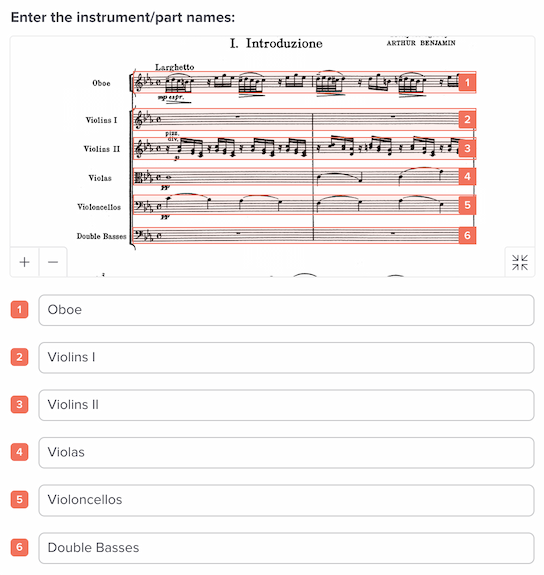
Previously we used generic names like “Track 1,” which you could later tweak in our editor, but we realized it’s nicer to do this as part of the scanning process.
More intuitive approach to linking instruments
Possibly the most common challenge for our system is figuring out how to handle the addition (or removal) of instruments in the middle of a piece. This situation often happens in piano-and-vocal music, where the vocal part doesn’t enter until a few bars in.
We already have an instrument-assignment tool to help with this, but it’s a bit technical. Now, we’ve got a much more intuitive solution.
If we encounter an instrument that we can’t obviously link to a previous instrument in the scan, we’ll ask you about it. Here’s what it looks like:
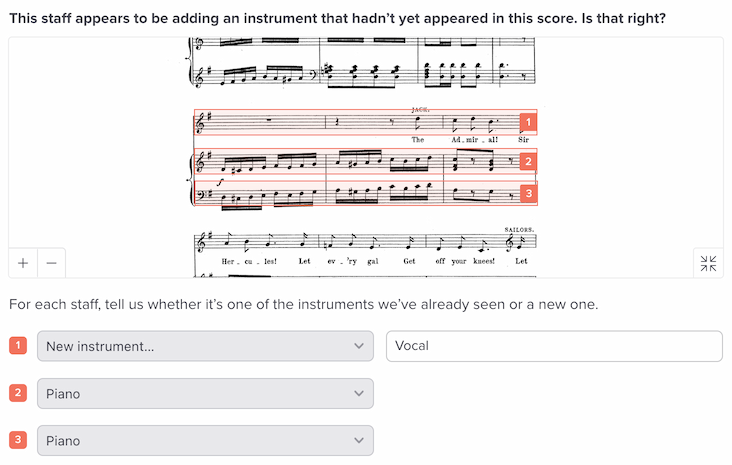
You’ll see the section of music, along with a way to select which instrument is associated with each staff. Our best guesses are prepopulated, and there’s a “New instrument” option that lets you say “This particular staff is new within this score.”
The older instrument-assignment tool still exists, but this new review question should save you from having to use it except for really strange musical situations.
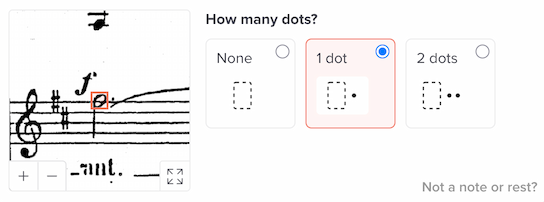
Zoom within review questions
We’ve added a way to zoom in and out of the images within review questions. Use the plus and minus icons at lower left:
Faster processing
We’ve spent a lot of time making the scanning system faster than ever before. All aspects of it are now faster, from initial analysis to the processing of review questions.