New: See detected beats when editing syncpoints
August 28, 2026
In our syncpoint editor (the tool that lets you sync notation with audio/video), you can now view auto-detected beat locations.
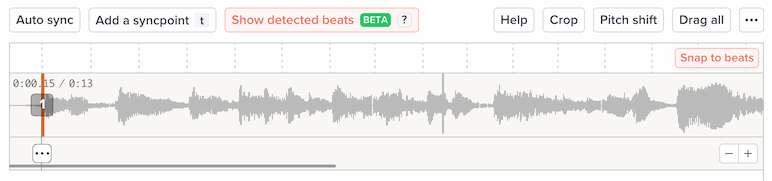
Click “Show detected beats” at the top, and we’ll display a ruler with vertical lines for each beat we’ve detected in your audio:
(By “beat,” we mean the rhythmic pulse in the music, like 1-2-3-4.)
By default, “Snap to beats” is active (at right). If this is active, then we’ll automatically snap to the nearest beat when you add syncpoints or drag existing ones:

Our goal here is to help you create syncpoints more quickly and accurately.
This new feature is now available for all MP3 recordings. We’ll eventually make this available for uploaded videos as well.