Support for key signature modes
March 25, 2026
You can now specify which mode your music uses (e.g., major vs. minor), and Soundslice will use that data to make various parts of the interface smarter.
In our editor, when you edit a key signature, you’ll now see a Mode section:
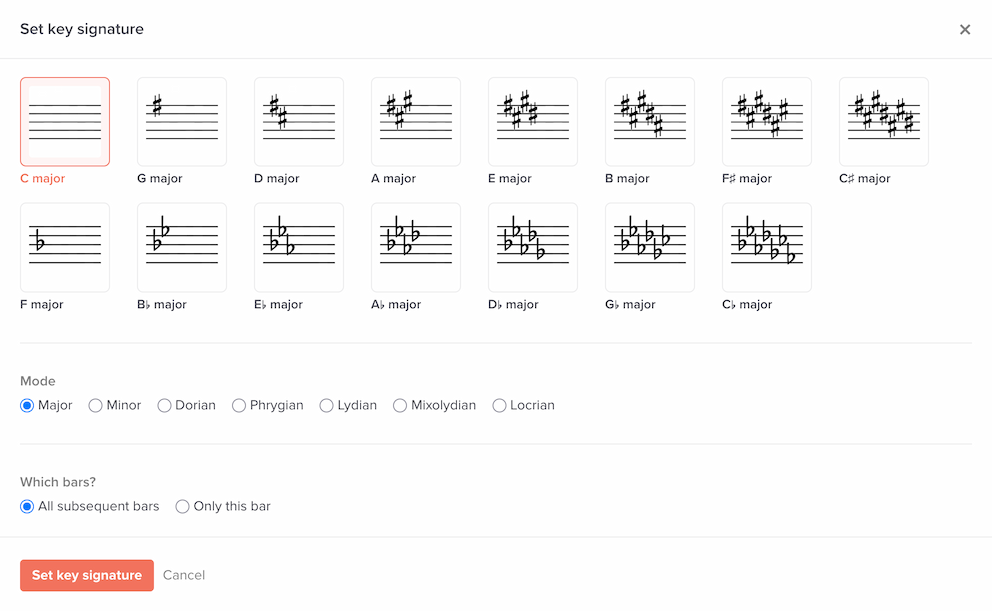
The options here are:
- Major
- Minor
- Dorian
- Phrygian
- Lydian
- Mixolydian
- Locrian
Generally speaking, most music is notated in either major or minor modes. The other modes are more obscure, but some day you might be happy they’re in there.
What’s the point of setting the mode? The mode isn’t communicated visually in notation, but Soundslice uses this data in a few other places:
- The transposition tool in player settings will display the mode when displaying the current key (e.g., “C major” or “A minor”). Previously it always assumed major.
- The auto pitch names feature will use the mode when calculating the pitch name in “Movable do” and “Scale degree” naming conventions. For example, the pitch “A” will be labeled as scale degree 6 in a C major key signature, and it’ll be labeled as scale degree 1 in an A minor key signature. Previously it always assumed major.
We’ve also improved our MusicXML and Guitar Pro (versions 6-8) importers to import the mode. And our MusicXML exporter includes the mode now, too.
All existing slices will be treated as major, which preserves our previous behavior. If you’re working with music in minor (or another non-major mode), we encourage you to take a few seconds to set the mode in your slices via our editor’s key signature function.