Hiding empty staves
If you’re using Soundslice with multi-instrument music, we will automatically hide staves that don’t contain any music. This helps save space and keeps things readable.
For example, this:
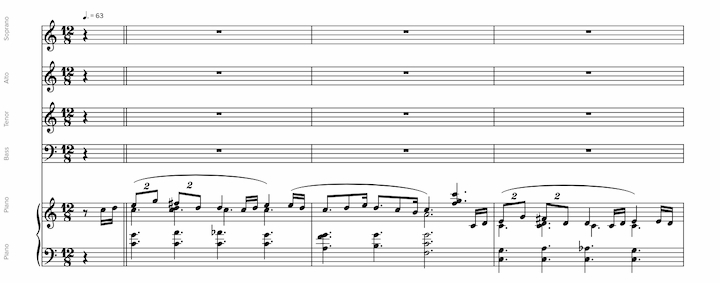
Becomes this:
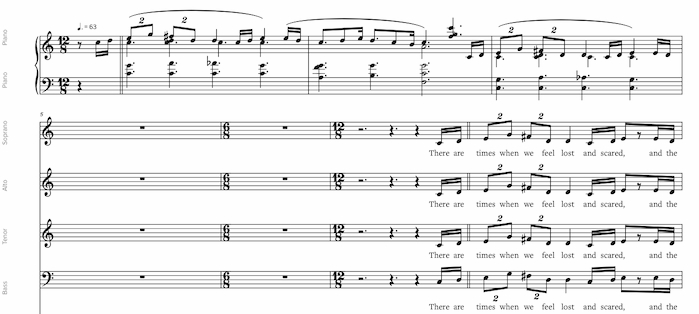
We’ll show a staff if it contains any notes or chord names.
To disable this behavior — hence displaying all staves, even if they’re empty, click at bottom right to open player settings, then find the “Appearance” section and click “Advanced” to show more options:
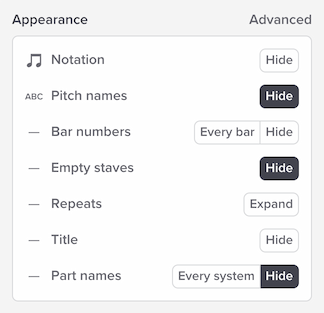
Next to “Empty staves,” uncheck “Hide.”
Hiding empty staves during editing
If you’re editing a slice, this setting will be ignored. We always show you all the staves during editing.
Grand staff instruments
Grand staff instruments use two staves grouped together. For the purpose of hiding empty staves, we look at the notation in both staves.
This means: if one of the staves in a grand staff instrument is totally empty, but the other one has music, we will continue to display the empty staff. We will only hide the staves for that instrument if both staves are fully empty. This keeps the music unambiguous, because otherwise it wouldn’t necessarily be clear which of the two staves we were automatically hiding.
Behavior of empty systems
If every staff within a system of music is empty, we’ll display a single (empty) staff for that system. In other words, we won’t hide the entire system.
This ensures that each moment of audio continues to have a corresponding visible area of notation. If we didn’t do this, behavior during playback would be odd and disjointed; the playhead position during that empty system’s music would be undefined.