Older device mode
If you’re using Soundslice with an older device, you might want to activate “Older device mode.” This will use a lighter version of audio playback that uses fewer resources. The tradeoff is: certain Soundslice features will be either disabled or degraded.
Activating older device mode
View a slice, then click at bottom right to open the player settings.
Look for the “Older device mode” section and click to expand it:
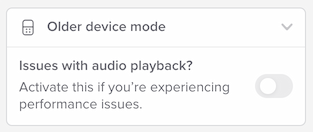
Check the box to enable older device mode.
Specific changes in older device mode
If you’ve activated older device mode, the following aspects of Soundslice will change:
- Audio slowdown for MP3s won’t sound as good.
- Looping for MP3s won’t be as precise.
- Pitch correction for MP3s will no longer be supported.
- Multitrack stems will no longer be supported.
- Audio transposition for MP3s will no longer be supported.
Older device mode has no effect on any of the following:
- Notation display
- Video functionality
- Editor functionality
Why don’t I see “Older device mode” in player settings?
We automatically hide this if the current slice doesn’t have any MP3 recordings. That’s because older device mode only affects MP3 playback. In slices without MP3s, it’s irrelevant.