Key signatures
Here’s how to edit key signatures using the Soundslice editor.
Choosing the bar
The easiest way to change a key signature is to click the key signature directly in your notation.
If, however, the key signature is C (in which case there’s no key signature to click!) or you want to change the key signature for a bar in the middle of a system (where there’s no existing key signature to click), then here’s how to do that. Select any note or rest in that bar, then:
- In editor’s top panel, open the “Bar” section and click the key signature icon .
- Or: Search the editor for “Change key signature.”
Setting the key signature
Once you’ve done the above, this will open the key signature screen:
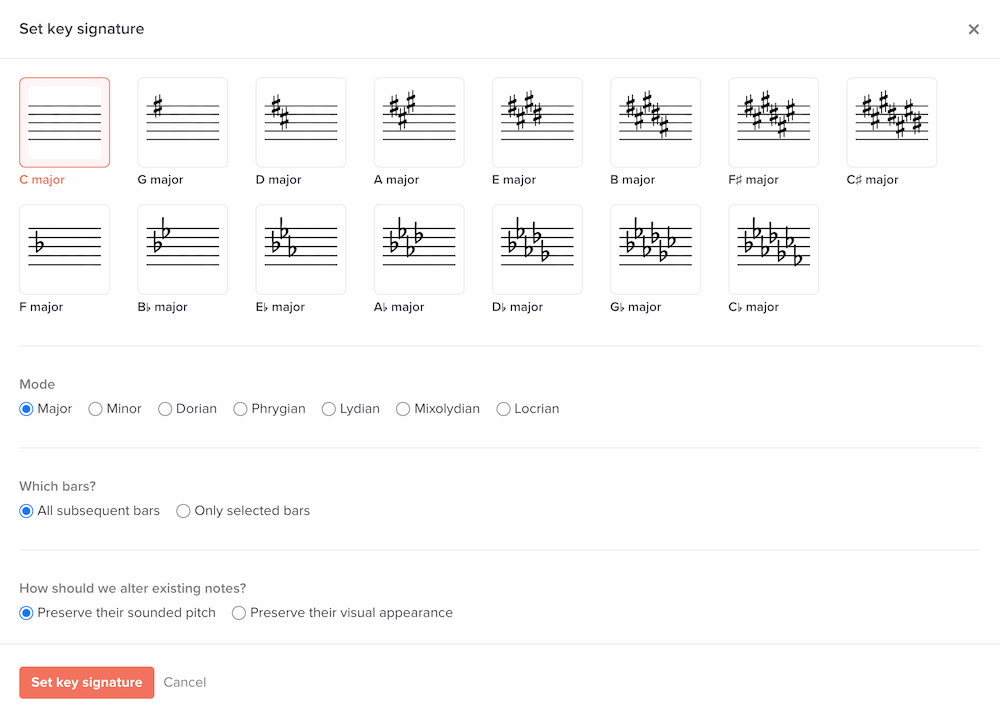
Here, you can choose the new key signature. You can also specify its mode, plus a few other options.
The options for “Which bars” are:
- All subsequent bars (from your selection until the end of the music)
- Only selected bars
The options for “How should we alter existing notes?” are:
- Preserve their sounded pitch. For example: if changing key signature from C major to G major, any F natural note will remain F natural.
- Preserve their visual appearance. This visually reinterprets existing notes according to the new key signature. For example: if changing key signature from C major to G major, any F natural note will change to F sharp. This option is useful for slices created via our scanning feature, in case we misdetected a key signature.
Modes
The mode options are:
- Major
- Minor
- Dorian
- Phrygian
- Lydian
- Mixolydian
- Locrian
When you change the selected mode, the labels below each key signature diagram will change. For example, “C major” will change to “A minor.”
Generally speaking, most music is notated in either major or minor modes. The other modes are more obscure, but some day you might be happy they’re in there.
What does setting the mode actually do?
The mode isn’t communicated visually in the notation, but Soundslice uses this data in a few other places:
- The transposition tool in player settings will display the mode when displaying the current key (e.g., “C major” or “A minor”).
- The auto pitch names feature will use the mode when calculating the pitch name in “Movable do” and “Scale degree” naming conventions. For example, the pitch “A” will be labeled as scale degree 6 in a C major key signature, and it’ll be labeled as scale degree 1 in an A minor key signature.
Key signatures for transposing instruments
If you edit a key signature for a transposing instrument, your options will be with respect to the instrument transposition.
For all other (non-transposing) instruments, the key signature options will be in concert pitch.
What happens to note spellings if I change a key signature?
We’ll automatically respell all notes within the bar(s) whose key signatures changed.
Does Soundslice support non-standard key signatures? Like, if I want to put accidentals on staff lines however I wish?
No. We only support conventional key signatures for the time being.
Why is there no option for an A♯ or D♯ key signature?
Those key signatures are mainly theoretical and difficult for musicians to read. Just use B♭ or E♭.