Migrating folders to lists
This page is pretty niche and likely doesn’t apply to you. It’s only for the benefit of people using our legacy “folders” system.
Until recently, Soundslice had two separate concepts: “folders” and “lists.” They started as separate things, but over time they became so similar that it was just plain confusing. So in January 2026, we merged the two concepts into a single concept: list.
This page explains the difference between folders and lists. This is specifically important for technical customers who have integrations via our data API.
Differences between folders and lists
Broadly, folders and lists are both collections of slices. They have some subtle differences, though, as outlined in this table.
| Folders | Lists |
|---|---|
| A slice can only be in one folder. | A slice can be in multiple lists. |
| Your folders can only contain slices you’ve created yourself. They cannot contain slices other people created. | Your lists can contain both slices you’ve created yourself and slices other people created (for example, slices somebody has shared with you). |
| In folders, you can’t manually reorder slices. | In lists, you can manually reorder slices. |
| A folder doesn’t have a dedicated “practice view.” | A list has a dedicated “practice view.” |
Beyond that, all other functionality is the same in folders and lists.
Advice for technical Soundslice users
If you’ve built a Soundslice integration using our data API, and you rely on folders, please update your integration to use lists instead of folders.
Here are some specific things to look for in your integration:
- Instead of the create folder endpoint, use create list.
- Instead of rename folder, use rename list.
- Instead of get folder contents, use get list.
- Instead of move slice to folder, use add slices to list and remove slice from list.
- In get slice, use the
"lists"data instead of"folder_id". - When using create slice, don't pass
"folder_id"anymore. - When using list all slices, don’t look for
"folder_id"anymore. - Folder IDs are integers, while list IDs are strings (max 8 characters).
We recommend grepping your codebase for folder — a simple yet effective way to see whether you’re using this feature.
Finally, we’ve added an API method called Convert folder to list. This does the conversion programatically, so you can migrate folders at your own pace, before we do the future systemwide migration.
Converting folders to lists via our site
We’ve got a tool to help with the migration. When viewing a folder on our site, click and choose “Convert folder to list.”
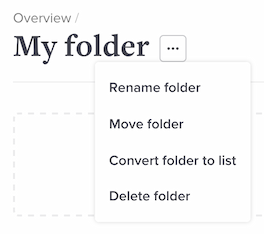
The following will happen:
- We’ll create a new list in your account, with the same name as the folder.
- All of the slices in the folder will be added to the new list.
- All of the subfolders in the folder will be converted into sublists within the new list (along with their slices).
- The folder (and its subfolders) will be deleted.
- This will not delete any slices.
- You’ll be immediately redirected to the new list. Everything will look roughly the same, but it’ll be a list instead of a folder now.